Dataset#
A dataset is a collection of features that are used together to train a model or perform model inference.

Define#
In an ADS Feature Store module, you can use the Python API or a yaml file to define a dataset.
The following example defines a dataset and gives it a name. A Dataset instance is created.
from ads.feature_store.dataset import Dataset

dataset = (
    Dataset
    .with_name("<dataset_name>")
    .with_entity_id(<entity_id>)
    .with_feature_store_id("<feature_store_id>")
    .with_description("<dataset_description>")
    .with_compartment_id("<compartment_id>")
    .with_query('SELECT col FROM <entity_id>.<feature_group_name>')
)
from ads.feature_store.dataset import Dataset

yaml_string = """
kind: dataset
spec:
  compartmentId: ocid1.compartment..<unique_id>
  description: <dataset_description>
  name: <dataset_name>
  featureStoreId: <feature_store_id>
type: dataset
"""

dataset = Dataset.from_yaml(yaml_string)
Create#
Use the the create() method of the Dataset instance to create a dataset.
Important
This method does not persist any metadata or feature data in the Feature Store. To persist the dataset and save feature data including the metadata in the Feature Store, use the materialise() method with a dataframe. For simple queries with only one level of nesting, users do not need to define with_feature_groups. However, in complex queries involving more than one level of nesting, users are required to define with_feature_groups.
from ads.feature_store.dataset import Dataset

dataset = (
    Dataset
    .with_name("<dataset_name>")
    .with_entity_id(<entity_id>)
    .with_feature_store_id("<feature_store_id>")
    .with_description("<dataset_description>")
    .with_compartment_id("<compartment_id>")
    .with_query('SELECT col FROM <entity_id>.<feature_group_name>')
)

dataset.create()
from ads.feature_store.dataset import Dataset
from ads.feature_store.feature_group import FeatureGroup

feature_group = FeatureGroup.from_id("<unique_id>")

dataset = (
    Dataset
    .with_name("<dataset_name>")
    .with_entity_id(<entity_id>)
    .with_feature_store_id("<feature_store_id>")
    .with_description("<dataset_description>")
    .with_compartment_id("<compartment_id>")
    .with_query('SELECT col FROM (SELECT col FROM <entity_id>.<feature_group_name> WHERE condition = 'some_condition') AS nested_table;')
    .with_feature_groups([feature_group])
)

# Create an dataset
dataset.create()
Load#
Use the from_id() method from the Dataset class to load an existing dataset by specifying the OCID. A Dataset instance is returned.
from ads.feature_store.dataset import Dataset

dataset = Dataset.from_id("<unique_id>")
Materialise#
Use the the materialise() -> DatasetJob method of the Dataset instance to load the data to dataset. To persist the dataset and save dataset data, including the metadata in the Feature Store, use materialise().
The .materialise() method has the following parameters:
input_dataframe: Union[DataFrame, pd.DataFrame]. Spark dataframe or Pandas dataframe.from_timestamp: str(Optional). From timestamp of dataset.to_timestamp: str(Optional). To timestamp of dataset.feature_option_details: FeatureOptionDetails(Optional). Feature option details for materialise operation.write_config_details: (merge_schema: bool, overwrite_schema: bool). Write configuration details for feature option details.read_config_details: (version_as_of: int, timestamp_as_of: datetime). Read configuration details for feature option details.
from ads.feature_store.dataset_job import DatasetJob

dataset_job: DatasetJob = dataset.materialise(dataframe)
See also
Get nearest neighbours#
You can call the get_nearest_neighbours() -> NearestNeighbour method of the Dataset instance to find the nearest neighbours for a feature field
- The
.get_nearest_neighbours()method takes the following parameter: field: Indicates which fields to fetch.k_neighbors: Number of neighbours to fetchembedding_vector: Embedding vector. Usually a dense vectormax_candidate_pool: Indicates the maximum candidate pool size
See also
Refer Data Types supported by feature store
See also
See Online feature store (Experimental) for the documentation on online feature store.
Get serving vector#
You can call the get_serving_vector() method of the Dataset instance to find the serving vector
- The
.get_serving_vector()method takes the following parameter: primary_key_vector: Primary key vector for dataset
See also
Refer Data Types supported by feature store
See also
See Online feature store (Experimental) for the documentation on online feature store.
Delete#
Use the .delete() method on the Dataset instance to delete a dataset. A dataset can only be deleted when its associated entities are all deleted.
dataset.delete()
Get Last Dataset Job#
A dataset job is the processing instance of a dataset. Each dataset job includes validation and statistics results.
With a Dataset instance, you can get the last dataset job details using get_last_job().
dataset_job = dataset.get_last_job()
Save Expectation Entity#
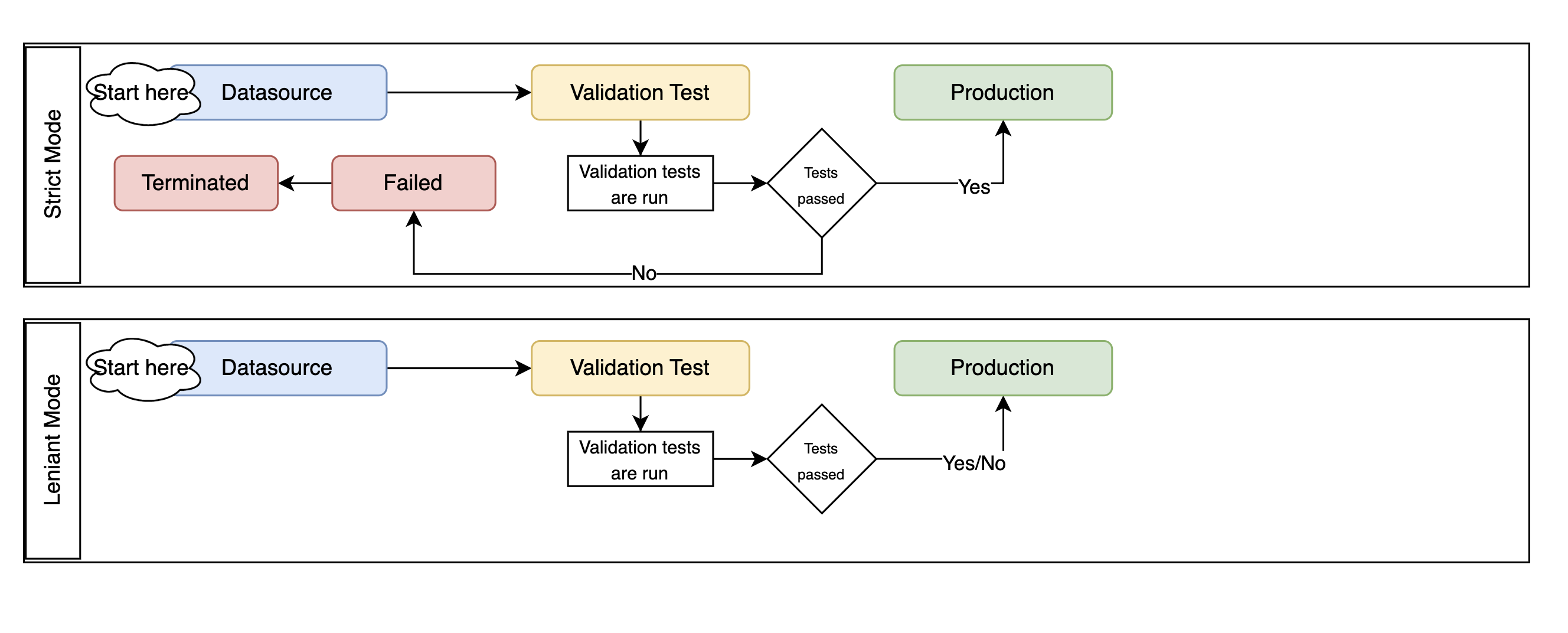
Feature Store allows you to define expectations on data being materialised into a dataset instance. With a Dataset instance, save the expectation details using with_expectation_suite() with the following parameters:
expectation_suite: ExpectationSuite.ExpectationSuiteof the great expectation library.expectation_type: ExpectationType. The type of expectation.ExpectationType.STRICT: Fail the job if the expectation isn’t met.ExpectationType.LENIENT: Pass the job even if the expectation isn’t met.
Note
Great Expectations is an open source Python-based library that validates, documents, and profiles data. It automates testing, which is essential for managing complex code bases.
from great_expectations.core import ExpectationSuite, ExpectationConfiguration
from ads.feature_store.common.enums import ExpectationType
from ads.feature_store.dataset import Dataset

dataset = Dataset.from_id("<unique_id>")

expectation_suite = ExpectationSuite(
    expectation_suite_name="expectation_suite_name"
)
expectation_suite.add_expectation(
    ExpectationConfiguration(
        expectation_type="expect_column_values_to_not_be_null",
        kwargs={"column": "<column>"},
    )

dataset_resource = (
        Dataset()
        .with_description("dataset description")
        .with_compartment_id(<compartment_id>)
        .with_name(<name>)
        .with_entity_id(entity_id)
        .with_feature_store_id(feature_store_id)
        .with_query(f"SELECT * FROM `{entity_id}`.{feature_group_name}")
        .with_expectation_suite(
            expectation_suite=expectation_suite,
            expectation_type=ExpectationType.STRICT,
        )
    )
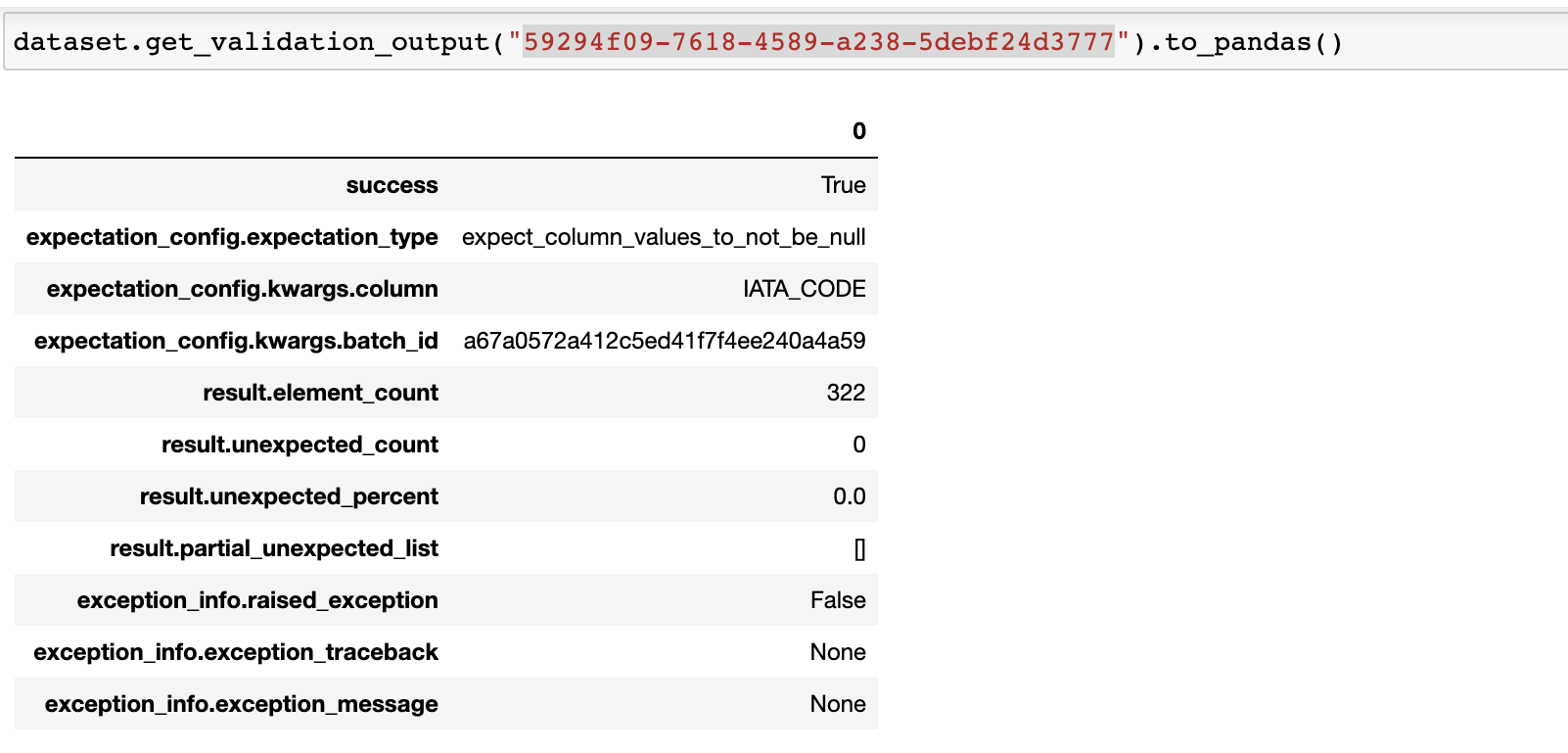
Use the the get_validation_output() method of the dataset instance to fetch validation results for a specific ingestion job.
The get_validation_output() method has the following optional parameters:
job_id: string. The ID of the dataset job.
get_validation_output().to_pandas() Outputs the validation results for each expectation as a Pandas dataframe.
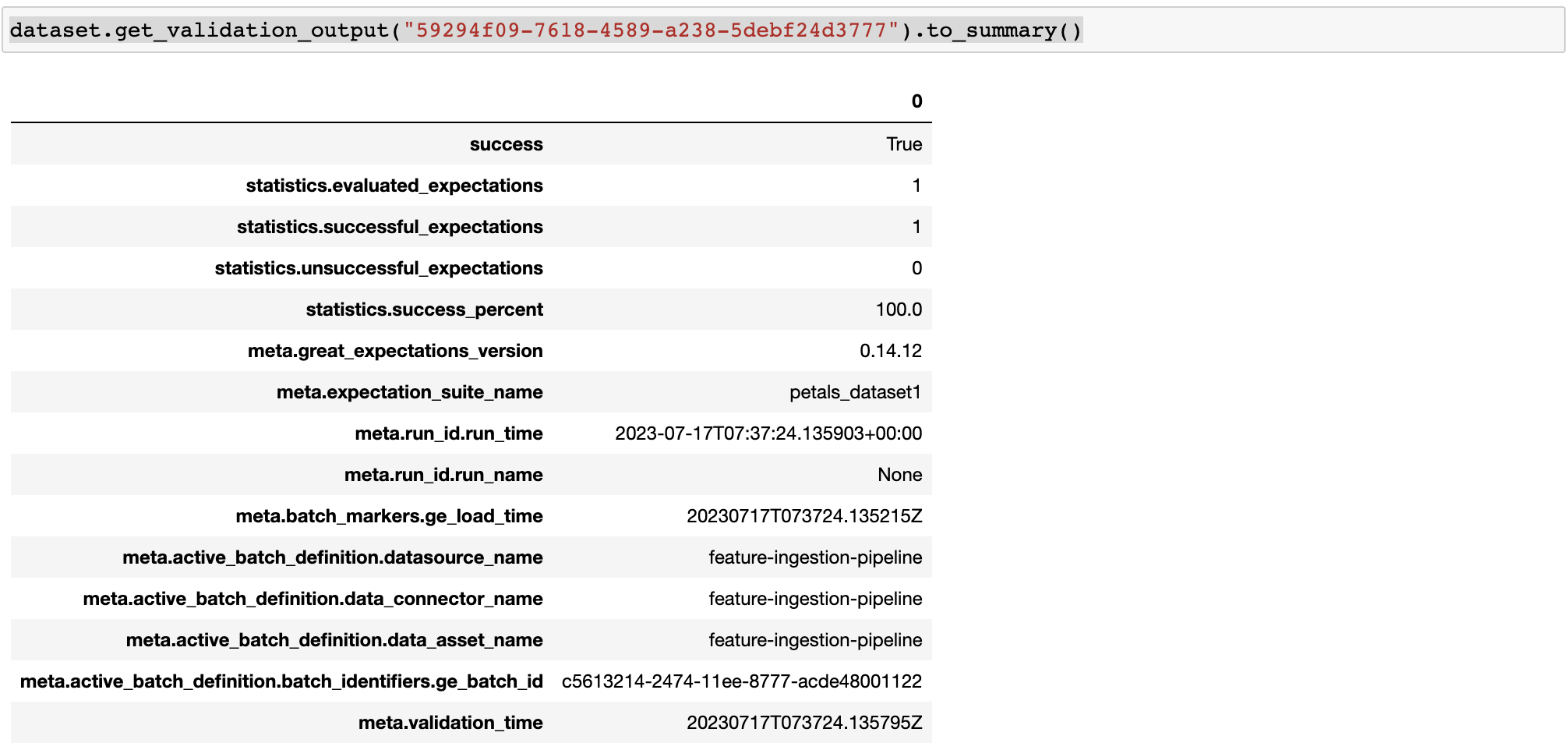
get_validation_output().to_summary() Outputs the overall summary of the validation as a Pandas dataframe.
See also
Statistics Computation#
During the materialisation, Feature Store performs computation of statistical metrics for all the features by default. The computation is configured using a StatisticsConfig object, which is passed at the creation of the dataset, or it can be updated later.
# Define statistics configuration for selected features
from ads.feature_store.statistics_config import StatisticsConfig
stats_config = StatisticsConfig().with_is_enabled(True).with_columns(["column1", "column2"])
This is used with Dataset instance.
from ads.feature_store.dataset import Dataset

dataset = (
      Dataset
      .with_name("<dataset_name>")
      .with_entity_id(<entity_id>)
      .with_feature_store_id("<feature_store_id>")
      .with_description("<dataset_description>")
      .with_compartment_id("<compartment_id>")
      .with_dataset_ingestion_mode(DatasetIngestionMode.SQL)
      .with_query('SELECT col FROM <entity_id>.<feature_group_name>')
      .with_statistics_config(stats_config)
)
Use the the get_statistics() method of the Dataset instance to fetch the metrics for a specific ingestion job.
The get_statistics() method has the following optional parameter:
job_id: string. The ID of the dataset job.
# Fetch stats results for a dataset job
df = dataset.get_statistics(job_id).to_pandas()

# Fetch and visualize stats for a dataset job
df = dataset.get_statistics(job_id).to_viz()

See also
Get features#
Use the the get_features_df() method of the Dataset instance to fetch features in a dataset.
# Fetch features for a dataset
df = dataset.get_features_df()
df.show()
Preview#
Deprecated since version 1.0.3: Use as_of() instead.
Use the the preview() method of the Dataset instance to preview the dataset.
The .preview() method has the following optional parameters:
- timestamp: date-time. The commit timestamp for the dataset.
- version_number: int. The version number for the dataset.
- row_count: int. Defaults to 10. The total number of rows to return.
# Preview dataset
df = dataset.preview(row_count=50)
df.show()
As Of#
Use the the as_of() method of the Dataset instance to get a specified point in time and time traveled data.
The .as_of() method has the following optional parameters:
commit_timestamp: date-time. The commit timestamp for the dataset.version_number: int. The version number for the dataset.
# as_of feature group
df = dataset.as_of(version_number=1)
Restore#
Use the the restore() method of the Dataset instance to restore the dataset to a particular version and timestamp.
The .restore() method has the following optional parameters:
- timestamp: date-time. The commit timestamp for the dataset.
- version_number: int. The version number for the dataset.
# Restore the dataset to a particular version and timestamp
df = feature_group.restore(version_number=2)
df.show()
Profile#
Use the the profile() method of the Dataset instance to profile the dataset.
# Profile dataset
df = dataset.profile()
df.show()
History#
Use the the history() method of the Dataset instance to show the history of the dataset.
# Show history of dataset
df = dataset.history()
df.show()
Visualize Lineage#
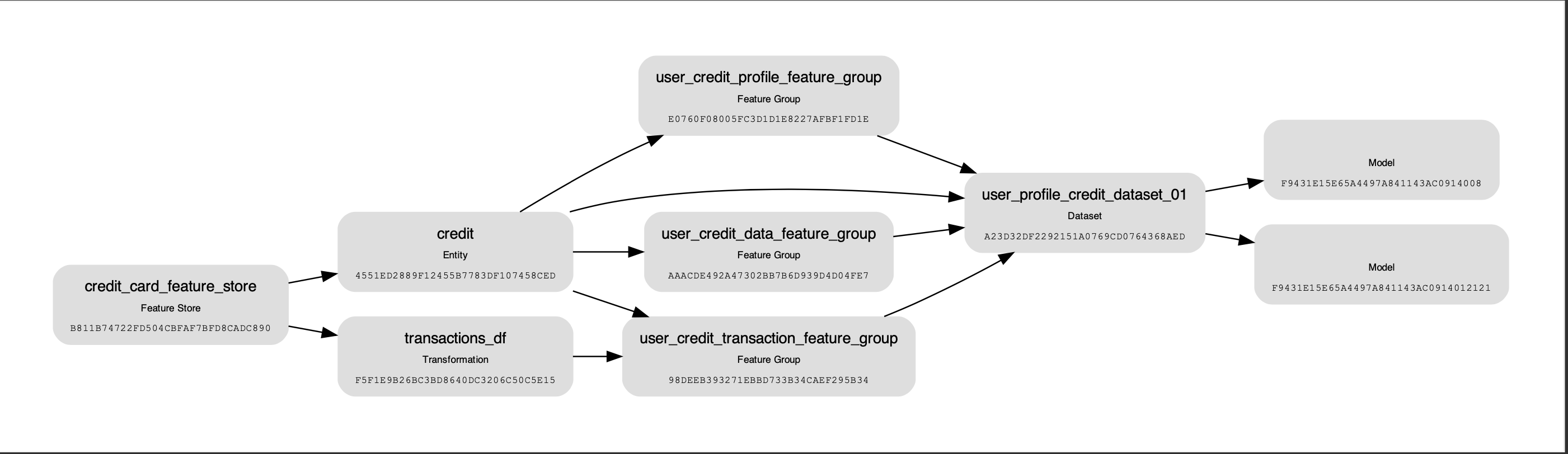
Use the show() method on the Dataset instance to visualize the lineage of the dataset.
The show() method has the following optional parameter:
rankdir: (str, optional). Defaults toLR. The allowed values areTBorLR. This parameter is applicable only forgraphmode. It renders the direction of the graph as either top to bottom (TB) or left to right (LR).
dataset.show()
The following is an example of the output:
Add Model Details#
Use the the add_models() method of the Dataset instance to add model IDs to the dataset.
The .add_models() method has the following parameter:
model_details: ModelDetails. Provideitems: List[str]as parameter and model IDs are passed as items.
dataset.add_models(ModelDetails().with_items([<ocid1.datasciencemodel..<unique_id>]))